
Easy Shopfloor
The operator's screen for Business Central production — start, stop, output and consumption registered where the work happens.
Production registration without the clipboard
Planners live in Business Central; operators do not. Easy Shopfloor gives them a web portal on the tablet or terminal at the work center: their routing tasks on a kanban board, one tap to start, pause or stop, output with lot, serial or package, component consumption with scrap — all written into the standard Business Central production tables the moment it happens. No middleware owns the data, no re-keying at the end of the shift, and the operator signs in with the same Microsoft account as everyone else.
Key features
A web app built for touch, backed by a Business Central app that validates every action.

Work centers and kanban
Browse work centers, machine centers and routing tasks in a tree; move tasks across routing statuses on a kanban board, one or many at a time.

Start · pause · stop
Operators and resources clock on and off a task; timestamps go to capacity ledger entries and production time sheets.

Output with tracking
Register quantities and scrap per operation, with lot, serial or package numbers assigned on the spot.

Component consumption
Consume components against the production order with quantities, scrap and tracking details.

Validated by Business Central
Every queued action is validated, dispatched and tracked by the Business Central app; errors come back to the operator's screen.

Only your work centers
Each user is mapped to work center groups; the portal shows the tasks that belong to them, nothing else.
Built for
Discrete and process manufacturers who plan in Business Central and want the floor to feed it back in real time.
Operators
One screen, big buttons, their own tasks; start, stop, output and consumption without learning Business Central.
Production supervisors
The kanban shows what is waiting, running and done per work center, and who is on it, as it happens.
Planners and controllers
Capacity entries, time sheets and output land in standard tables, so planning, costing and reports see the shift immediately.
What is inside
A Business Central app plus a web portal; both are part of Easy Shopfloor.
Operator portal
- Work center tree and kanbanWork centers, machine centers and routing tasks by status; batch status changes and resource assignment.
- Task registrationStart, pause and stop with process timestamps; output and consumption entry with tracking.
- Built for the floorTouch-friendly web app, installable on tablets and terminals, Microsoft Entra sign-in.
Message queue
- Queued operator actionsActions persisted with their payload, dispatched to Business Central logic, status tracked.
- Immediate feedbackThe portal follows the queue entry and shows the result or the error within seconds.
- Inspection and cleanupQueue pages for staff to inspect, retry or clean up entries.
Process monitoring
- In-progress entriesWho works on which task since when, with quantities.
- Capacity ledgerFinalised process entries become capacity ledger entries.
- Production time sheetsTime sheet lines created and closed from the floor.
Personnel and resources
- Personnel on routing linesAssign people to production routing lines.
- Resource statesAvailable, In use, Offline per resource.
- Work center groups per userA default group plus extra groups define each operator's task list.
Output and tracking
- Output journal linesCreated and registered from the portal, with scrap.
- Consumption journal linesComponent consumption with quantities and scrap.
- Lot · serial · packageTracking assigned during output and consumption; item ledger extended with shopfloor context.
Assets and data
- Asset KPI fieldsKPI-related fields on work centers, machine centers and groups, exposed through an API.
- Capacity entry extensionsCapacity ledger entries carry shopfloor and KPI context.
- APIs for the portalTask, queue and asset APIs in Business Central; the portal calls them with the operator's own token.
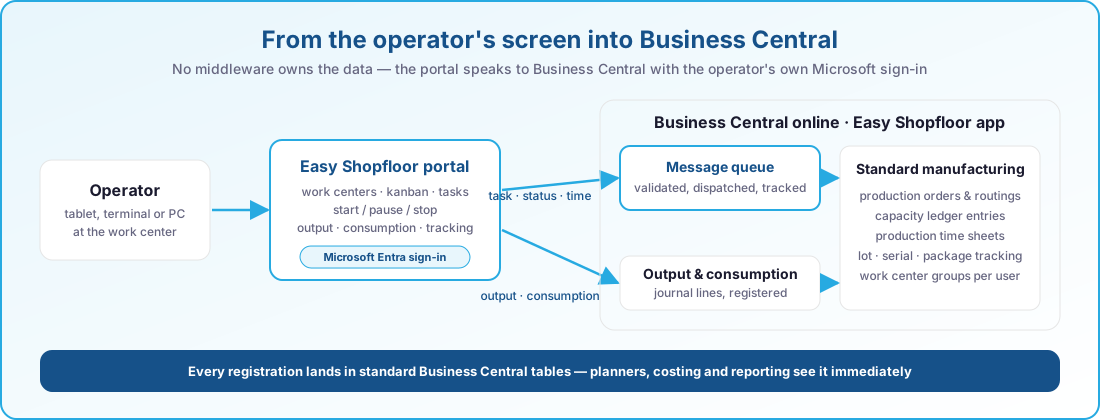
From the operator's screen into Business Central
Task and status actions go through a validated queue; output and consumption go to the production journals. Both land in standard tables.
- Microsoft Entra sign-in
- Business Central APIs, no middleware data store
- Queue result within seconds
- Standard tables, standard reports
At a glance
- Work center tree and routing-task kanban
- Start, pause and stop with capacity entries and time sheets
- Output with lot, serial or package and scrap
- Component consumption with tracking
- Batch task status and resource assignment
- Validated, tracked message queue with inspection pages
- Work center groups per operator
- Resource states Available, In use, Offline
- Asset KPI fields and API
- Touch-friendly web portal with Microsoft Entra sign-in
Always current on Business Central online
Our apps are built for Dynamics 365 Business Central online and follow Microsoft's release rhythm. There is no version to pick and nothing to upgrade by hand.
Two major releases a year
Every app is validated against the next Business Central release before Microsoft rolls it out, so the update wave never catches you off guard.
Monthly updates included
Fixes and improvements ship through AppSource and your Business Central admin center, with the same monthly cadence as the platform.
Current and previous release supported
You can stay on the release schedule your organisation prefers; we support the current major version and the one before it.
Works well with
Easy Shopfloor is one of a family of apps that share the same Business Central foundation.
Easy Manufacturing
Run production and engineer-to-order projects in one place, from budget to last operation.
- Projects, budgets and timesheets linked to the production order
- Line clearing, flushing, treatments, split components and subcontracting
- Weight, volume and formula-driven quantities
- Material shortages visible before the order starts
Easy Barcode Scanning
Receive, put away, pick, move and count by scanning instead of typing.
- Item, lot and location validated at every scan
- Picking, put-away, movements and package reclassification
- Physical inventory counting on the device
- Runs on a Zebra scanner or a standard Android phone
Easy Quality Management
Give every lot a status, and let the warehouse enforce it.
- Quarantine, pending approval and released as a real lot status
- Blocked, expired or aged lots cannot be picked, consumed or shipped
- FEFO and LIFO lot selection, automatic or guided
- The supplier’s own batch number kept end to end
- Automatic expiry, aging and quarantine timeouts
See Easy Shopfloor in action
Book a short demo and discover how your teams can register faster and steer better.