Scan instead of type, straight into Business Central
Standard warehouse execution in Business Central assumes a keyboard. Easy Barcode Scanning adds a mobile scanning layer where item, lot, serial, package and bin are validated the moment they are scanned — before anything is confirmed. Every scan runs through a two-phase pattern: identify, then confirm, so the worker sees exactly what will happen before it happens. The result posts straight into the same warehouse activities, inventory counts and ledger entries Business Central already keeps, with no separate WMS and no re-keying.
Key features
Runs on standard Business Central warehouse data — no external system, no duplicate administration.

Warehouse activities
Pick, put-away, movement and package reclassification, guided scan by scan with free-scan session linking.

Physical inventory counting
Count stock directly on the device, written straight into the standard physical inventory recording lines.

Validated at every scan
Item, lot, serial, package and bin are checked the instant they are scanned, before a transaction is registered.

Two-phase scan pattern
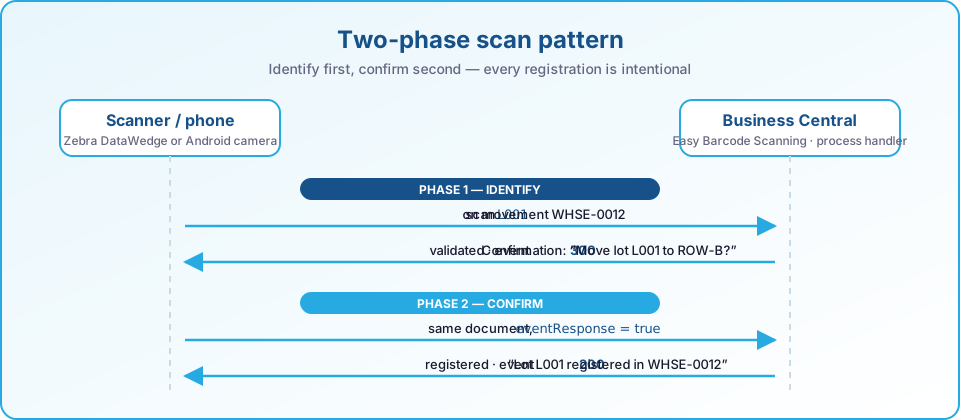
Identify first, confirm second — a JSON process and event response protocol keeps every registration intentional.
Configurable without code
Turn any error, notification or confirmation into the behaviour your warehouse needs from the Process Event Definitions page.

Runs on your hardware
Zebra DataWedge scanners or a standard Android phone camera — the same workflows either way.
Built for
Easy Barcode Scanning is for teams who still write down what they scanned.
Warehouse teams on paper or spreadsheets
Replace manual registrations with guided scan steps that validate as the work happens, not after.
Zebra hardware fleets
Drop onto existing Zebra DataWedge scanners, with a standard Android camera as a fallback.
Multi-step warehouse flows
Put-away, picking, movements, package reclassification and counting handled by one app and one login.
What is inside
The app is organised by warehouse process; switch on what you need in Scanning Setup.
Warehouse activities (WMSSCANNING)
- Pick, put-away and movementGuided scan-to-bin workflows for every warehouse activity line, with confirmation before registration.
- Package reclassificationReassign, empty or remove a package from a bin using the same validated scan pattern.
- Free-scan session linkingLink stock scanned outside a document to the activity it is already committed to.
Inventory and receiving
- Physical inventory countScan-based counting that writes straight into the standard recording lines (WMSCOUNT).
- Warehouse receiptManual recording pages for incoming goods today, with scan-based receiving underway (WMSRCPT).
- Shipment and quality controlWarehouse shipment and quality control scan handlers are in active development (WMSSHPMT, QAQC).
Framework and extensibility
- Two-phase scan and event protocolEvery scan returns document state plus process events — errors, notifications, confirmations or actions.
- Event overrides without codeChange an event's type, scope or display mode from the Process Event Definitions page — no development needed.
- Integration events for extensionsPublished hooks let other Business Central extensions add validation, filters or side effects to the scan pipeline.
How a scan becomes a registration
Standard Business Central warehouse documents, a device in the aisle, and a validation step in between — nothing is written until it is confirmed.
- Scanner or phoneZebra DataWedge or Android camera
- ValidateItem, lot, serial, package, bin
- Confirm on the device“Move lot L001 to ROW-B?”
- RegisteredStandard warehouse activity lines


Guided processes
- Pick, put-away and movement, scan by scan
- Package reassignment, assignment and removal
- Physical inventory counting into the standard recording lines
- Free-scan sessions linked to the activity the stock is committed to
Runs on
Two-phase scan pattern
Identify first, confirm second. The device sends the barcode, Business Central resolves it and asks; the device sends the same document back with the answer, and only then is the warehouse line registered.
- JSON process and event protocol
- Document state in every response
- Idempotent on the device's document
Process events — configured, not coded
Every scan is answered with events the device renders. Their type, scope and display mode are data in Business Central, so the warehouse decides how strict a step is.
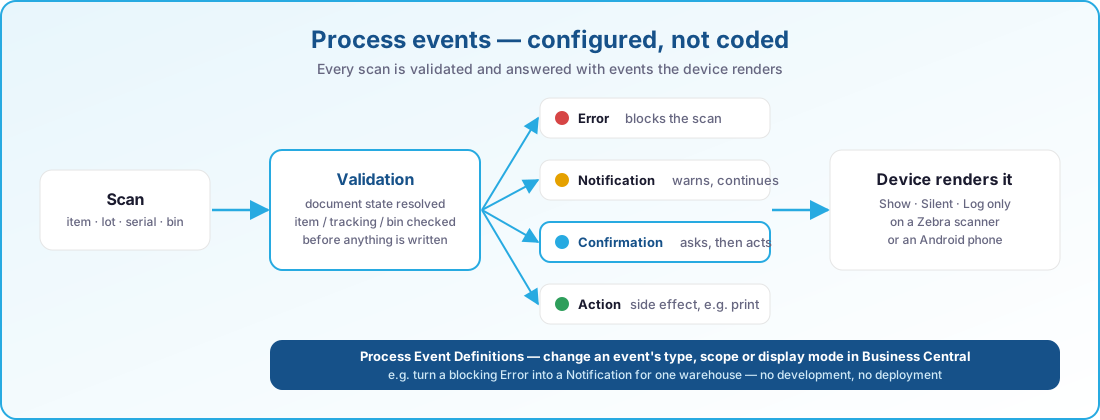
Integration events let other Business Central extensions add their own validation, filters or side effects to the same pipeline.
At a glance
- Warehouse activities - pick, put-away, movement and package reclassification
- Physical inventory counting on the device
- Warehouse receipt, with shipment and quality control in development
- Two-phase scan pattern with a JSON process and event response protocol
- Configurable event overrides - error, notification, confirmation or action - without code
- Runs on a standard Android camera or Zebra DataWedge hardware scanners
- Companion mobile client built with Angular, Ionic and Capacitor
- OAuth2 sign-in to Microsoft Graph and Business Central
Always current on Business Central online
Our apps are built for Dynamics 365 Business Central online and follow Microsoft's release rhythm. There is no version to pick and nothing to upgrade by hand.
Two major releases a year
Every app is validated against the next Business Central release before Microsoft rolls it out, so the update wave never catches you off guard.
Monthly updates included
Fixes and improvements ship through AppSource and your Business Central admin center, with the same monthly cadence as the platform.
Current and previous release supported
You can stay on the release schedule your organisation prefers; we support the current major version and the one before it.
See Easy Barcode Scanning in action
Book a short demo and see how your warehouse team can work faster with fewer errors.