
Easy Quality Management
Give every lot, serial and package a status in Business Central — and let the warehouse enforce it.
Quality decisions that the warehouse cannot bypass
Business Central knows which lot is where, but not whether it may be used. Easy Quality Management adds that answer to the tracking record itself: Quarantine, Pending approval, Released, Blocked, Expired, Aged. Picks, shipments and consumption then only see Released stock; blocked bins and zones stop goods from moving in or out; scheduled rules age and expire lots automatically; and the supplier's own lot and serial numbers travel with the goods from receipt to posted entry. Quality becomes a property of the stock, not a note next to it.
Key features
Everything lives on the standard Business Central tracking records — no parallel quality database.

Tracking status
Quarantine, Pending approval, Released, Blocked, Expired and Aged on every lot, serial and package; availability and shipment checks allow Released stock only.

Blocked bins and zones
Block inbound or outbound movement per location, zone, bin type, bin or bin content; put-away and pick calculations skip blocked bins.

FEFO / LIFO picking
Preselect lots for a pick or let the app suggest available lots by expiry or age, with complete-lot and complete-package options.

Supplier lot and serial numbers
Store the external lot and serial number next to your own and propagate them through ledger and warehouse records, counts and labels.
Bulk corrections with preview
Change status, external numbers and QC comments for many lines at once; review the reclassification journal before it posts.

Scanning and labels aware of status
Scan buffers show the status and warn or block on incomplete lots; label reports carry the tracking fields through Report Selection.
Built for
Companies that must prove which batch went where — and keep the wrong one from going anywhere.
QA and QC teams
Release, block and comment on lots from a role centre built for it, with scheduled expiry and ageing rules doing the routine work.
Warehouse operators and managers
Picks that only offer released stock, bins that refuse blocked goods, counts and labels that carry the supplier's numbers.
Regulated manufacturers and distributors
Food, chemicals, pharma and technical parts: traceability from supplier lot to shipment, with the decision history on the record.
What is inside
Switch modules on independently in Quality Management Setup.
Status and rules
- Item tracking statusCustom statuses on lots, serials and packages with a default on receipt.
- Scheduled transitionsJob-queue rules move stock to Expired or Aged on expiry date or age.
- Availability and shipment checksOnly Released stock counts as available or may be shipped.
Tracking information
- External lot and serialSupplier numbers stored on the tracking record and propagated event-driven into ledgers and warehouse records.
- Number formattingItem-level formats for lot and serial numbers.
- Bin tracking FactBoxWhere each lot sits, per bin, on the pages where you need it.
Warehouse and picking
- Inbound / outbound blockingConfigured through the location → zone → bin type → bin → bin content hierarchy.
- Blocked-bin filteringPut-away and pick calculations never land on or take from a blocked bin.
- Preselection and FEFO / LIFOChoose lots yourself, then let the app fill the remaining demand by expiry or age.
Operational workflows
- Modify item tracking wizardBulk status, external-number and QC-comment edits with journal preview and posting.
- Inventory countingPhysical inventory that carries external numbers through to the posted records.
- Tracking-aware revaluationRevaluation journal extended with tracking context.
Attributes, labels and scanning
- Tracking attributesAttribute codes on tracking that can generate extended text.
- Label reportsLot, serial and package labels with configurable field mapping and Report Selection.
- Scanning integrationTracking status and external numbers exposed to the scanner; QA/QC warnings; incomplete full-lot moves rejected.
Administration
- Setup switchesEach module enabled on its own.
- Utility reportsCorrect or propagate legacy tracking data in bulk.
- Role centresQA/QC Manager and Operator role centres with configurable cues and a bin-level tracking API for reporting.
Status flow
Stock arrives in quarantine; QA releases or blocks it; rules age and expire it; the warehouse acts on the result.
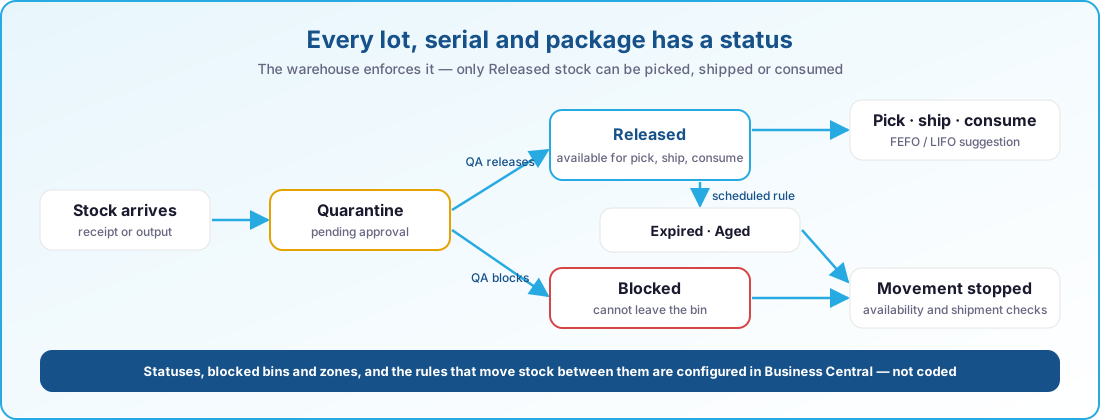
- Quarantine · Pending approval · Released
- Blocked · Expired · Aged
- Rules on expiry date and age
- Checks on availability, pick and shipment
At a glance
- Six tracking statuses on lots, serials and packages
- Only Released stock available, pickable and shippable
- Blocked bins and zones for inbound and outbound movement
- FEFO / LIFO lot suggestion with preselection
- Supplier lot and serial numbers carried through all records
- Bulk tracking corrections with journal preview
- Scheduled expiry and ageing transitions
- Status-aware scanning and label printing
- QA/QC role centres and a bin-level tracking API
Always current on Business Central online
Our apps are built for Dynamics 365 Business Central online and follow Microsoft's release rhythm. There is no version to pick and nothing to upgrade by hand.
Two major releases a year
Every app is validated against the next Business Central release before Microsoft rolls it out, so the update wave never catches you off guard.
Monthly updates included
Fixes and improvements ship through AppSource and your Business Central admin center, with the same monthly cadence as the platform.
Current and previous release supported
You can stay on the release schedule your organisation prefers; we support the current major version and the one before it.
Works well with
Easy Quality Management is one of a family of apps that share the same Business Central foundation; scanners see the status through Easy Barcode Scanning and labels print through Easy Label Printing.
Easy Barcode Scanning
Receive, put away, pick, move and count by scanning instead of typing.
- Item, lot and location validated at every scan
- Picking, put-away, movements and package reclassification
- Physical inventory counting on the device
- Runs on a Zebra scanner or a standard Android phone
Easy Label Printing
Design, preview and print Zebra labels straight from Business Central — no PC next to the printer.
- Central ZPL templates per company and language
- GS1-128, GS1 DataMatrix, QR, Code 128 and EAN
- Preview with real order data before you print
- Printers, scales and job history visible inside Business Central
Easy Manufacturing
Run production and engineer-to-order projects in one place, from budget to last operation.
- Projects, budgets and timesheets linked to the production order
- Line clearing, flushing, treatments, split components and subcontracting
- Weight, volume and formula-driven quantities
- Material shortages visible before the order starts
See Easy Quality Management in action
Book a short demo and see how quality control becomes part of daily operations.