
Cloud Label Printing for Business Central
Design, preview, manage and print Zebra labels directly from Business Central using PrintNode and ZPL.
Label intelligence lives in Business Central
Manage your labels centrally in Business Central and print to Zebra printers anywhere in the world. PrintNode is only the print transport layer — the label intelligence lives in BC.
Technical Capabilities
Templates, preview and printing live in Business Central online — PrintNode is only the transport.
ZPL Template Management
Create, store and version ZPL label templates centrally inside Business Central.

Label Preview
Preview the rendered label with live sample data before a single label is printed.

Cloud Printing
Send jobs to any connected printer worldwide through the PrintNode transport layer.

Barcode Support
Code 128, Code 39, EAN and UPC symbologies rendered directly from ZPL.

GS1 Support
GS1-128 and GS1 DataMatrix for compliant logistics and shipping labels.

PrintNode Integration
Reliable cloud print transport to Zebra and other printers — no local software.
Built for
Companies that print labels from Business Central at more than one place.
Warehouses and production sites
Bin, item, production and shipping labels at the point of work, on Zebra, Honeywell or Brother printers, without a print server.
Distributed and multi-company organisations
One set of templates, printed at any site worldwide; child accounts per company or location under one white-label subscription.
Cloud-first IT teams
No RDP, no terminal server, no local agent to maintain — only the PrintNode client next to the printer.
What is inside
Easy Label Printing combines the Easy Print-Node app with ZPL label layouts for Business Central.
Label templates
- ZPL as report layoutUpload a .zpl file as a Business Central report layout; the dataset is merged into it, one label per row.
- Page-accurate previewZPL rendered to Word and PDF with real barcode fonts before anything is printed.
- Barcodes from ZPL^B commands mapped onto the Business Central barcode module: Code 128, Code 39, EAN, UPC, QR, GS1.
Printing
- Report-to-printer mappingRoute each report to a printer, or a default printer per user, location or company.
- Raw ZPL and PDF jobsLabels go to the printer verbatim as raw ZPL; documents as PDF — both through the PrintNode API.
- Job trackingStatus and history of every print job inside Business Central.
Administration
- Printer syncAutomatic discovery of printers and computers connected to PrintNode, online/offline status and capabilities.
- Child accounts (white label)Create and manage PrintNode child accounts per company or site under the Easystep2 subscription.
- Scales and permissionsRead weights from PrintNode-connected scales; PRINTNODE and PRINTNODE SETUP permission sets.
Centralized Label Management
Store label templates directly in Business Central.
One place for every label
- Item labels
- Warehouse labels
- Shipment labels
- Production labels
- GS1 labels
Built for real operations
- Version control on every template
- Central management across teams
- Multi-company support
- Multi-language support
Visual ZPL Preview
Upload or create ZPL templates and preview them before printing.
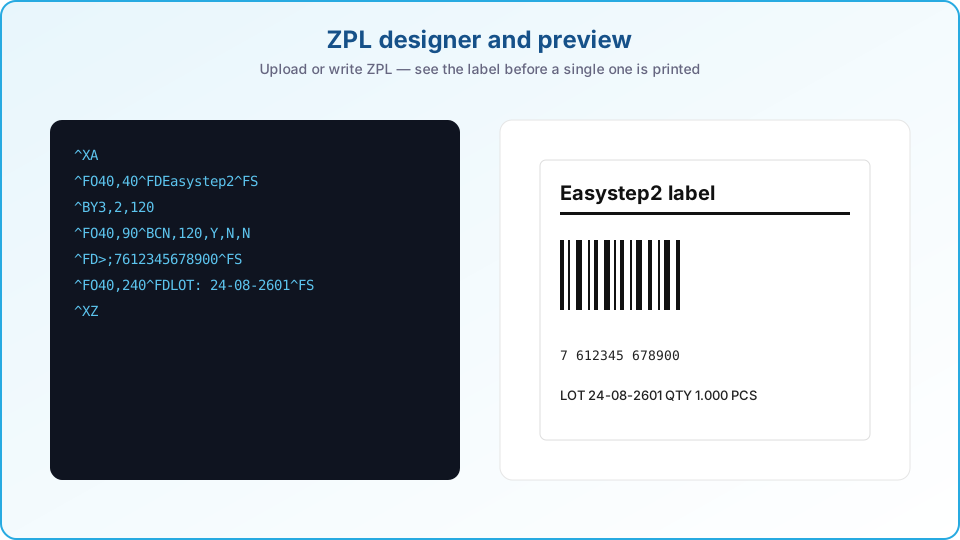
- Upload ZPL
- Render preview
- Test with sample data
- Download PDF
- Download Word
- Validate output
Cloud Printing with PrintNode
Print directly from Business Central to Zebra printers.
- Business CentralTrigger a print job
- PrintNode CloudRoutes securely
- PrintersOn-site or remote


No infrastructure headaches
- Remote printing
- No RDP
- No terminal server
- No local custom software
Supported printers
Warehouse Label Examples
Real label formats, rendered straight from ZPL templates.
Havenweg 12
3011 XX Rotterdam
AI Label Conversion
Already have existing label layouts? Let AI rebuild them for Business Central.
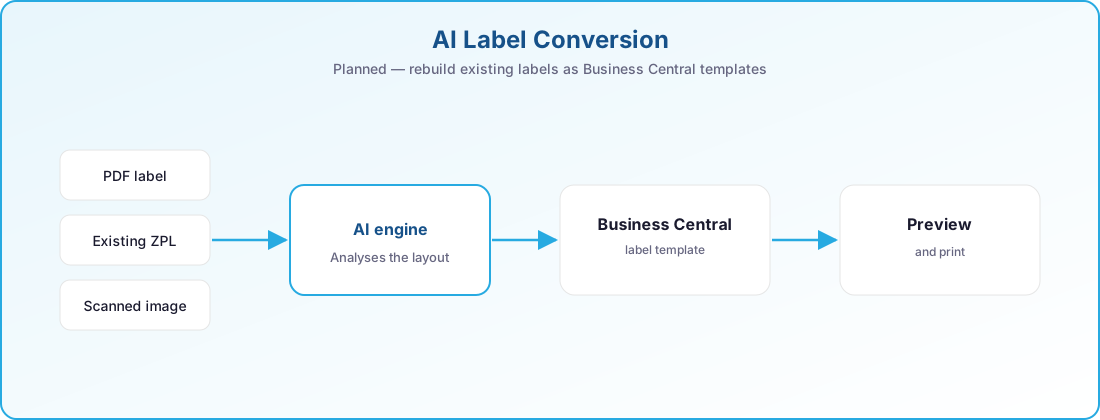
This capability is on our roadmap and is not currently available. It will let you upload a PDF label, existing ZPL, a supplier label or a scanned image, and generate a Business Central compatible template automatically.
At a glance
- ZPL Template Management
- PDF Export
- Word Export
- Label Preview
- Cloud Printing
- Barcode Support
- QR Code Support
- GS1 Support
- Multi-Language Templates
- PrintNode Integration
- Printer discovery and job tracking from PrintNode
- Child accounts per company or site (white label)
Always current on Business Central online
Our apps are built for Dynamics 365 Business Central online and follow Microsoft's release rhythm. There is no version to pick and nothing to upgrade by hand.
Two major releases a year
Every app is validated against the next Business Central release before Microsoft rolls it out, so the update wave never catches you off guard.
Monthly updates included
Fixes and improvements ship through AppSource and your Business Central admin center, with the same monthly cadence as the platform.
Current and previous release supported
You can stay on the release schedule your organisation prefers; we support the current major version and the one before it.
Works well with
Easy Label Printing is one of a family of apps that share the same Business Central foundation.
Easy Barcode Scanning
Receive, put away, pick, move and count by scanning instead of typing.
- Item, lot and location validated at every scan
- Picking, put-away, movements and package reclassification
- Physical inventory counting on the device
- Runs on a Zebra scanner or a standard Android phone
Easy Sales & Marketing
Around forty improvements to the daily sales and purchase flow.
Learn more →Warehouse & shopfloorEasy Shopfloor
Give operators one simple screen at the line and planners a live view of the floor.
- Web portal on any tablet or terminal at the workstation
- Report quantity, time and progress at the machine
- Kanban board and live analytics for planning
- Role-based access per workstation
See cloud label printing in action
Book a short demo and we will print one of your own labels to a Zebra printer, live from Business Central.