
Easy Ingredients
Manage raw-material classification, transport details and recipes in Business Central, using the same data for labels and documents.
Compliance that starts at the item card
Chemical, coatings, cosmetics and food producers need detailed regulatory data alongside their stock and production records: CAS and UN numbers, GHS/CLP hazard statements and pictograms, ADR transport classes and the 1000-points rule, UFI codes for poison-centre notifications, and a CMR that must state the dangerous goods on board. Easy Ingredients puts all of that on the item, the lot and the production BOM. It validates BOMs, checks that recipe composition totals 100 % and extracts supplier document data for your review and approval. Labels, transport documents and recipes use the classification you maintain in Business Central.
Key features
Manage classification in Business Central online, without a separate compliance database. Document AI extracts supplier data for your review.

Dangerous-goods classification
GHS/CLP hazard classes, H-, EUH- and P-statements, signal words and pictograms per item and lot, with the CLP, ADR, OSHA and WHMIS regulation sets to import.

ADR transport compliance
Hierarchical ADR classes, packing groups, tunnel codes, UN transport categories and the 1000-points rule (ADR 1.1.3.6) calculated per shipment.

CAS, UN and UFI identifiers
CAS registry numbers with synonyms, UN numbers with transport category and factor, UN packaging codes, and UFI codes generated inside Business Central to the ECHA algorithm.

Recipe, formulation and packaging BOMs
BOM types with their own certification rules, a 100 % composition check on recipes, and process loss kept separate from the recipe quantity.

Regulatory documents and labels
CMR documents with per-transport-category totals on sales, transfer, return and warehouse shipments; a GHS-compliant product packaging label as a Word layout.

Supplier documents read by AI
Attach or e-mail a supplier SDS, TDS, CoA or CoC. AI extracts the data; you review and approve it before it updates Business Central.
Built for
Process manufacturers who sell, ship or produce hazardous or classified materials from Business Central.
Chemicals, coatings and adhesives
Hazard classification, ADR transport and CMR documents on every shipment; UFI codes on every hazardous mixture.
Cosmetics and personal care
Recipe BOMs that must add up to 100 %, CAS-identified substances and the label data that follows from them.
Food, flavours and specialty ingredients
Formulation and packaging BOMs, process loss that is not part of the composition, and supplier documents captured without re-typing.
What is inside
The app is organised in modules on a shared classification foundation; switch on what applies to you in Ingredients Setup.
Chemical identification
- CAS registration numbersRegistry numbers with synonyms, hyperlinks and item reference integration.
- UN registration numbersFour-digit UN numbers with transport categories and 1000-points factors.
- UN packaging classificationsCertified packaging and container codes (4G, 1A1, …) with performance levels, multi-language.
Hazard classification
- GHS classificationsH-, EUH- and P-statements, signal words, pictograms and regulation sets.
- Dangerous goodsGHS/CLP, ADR, OSHA and WHMIS classes on items and lots.
- Unique Formula Identifier (UFI)Deterministic ECHA algorithm inside Business Central; no external service.
Transport and documents
- ADR transport regulationsHierarchical ADR classes, packing groups, tunnel restriction codes, 1000-points rule.
- CMR documentsDangerous-goods data and per-category totals on sales, transfer, return and warehouse shipment CMRs.
- Product packaging labelGHS-compliant label dataset rendered through a Word layout; per-item report overrides.
Items and attributes
- Extended item attributesNumeric ranges (280–290), comparison operators (>150), filter syntax, regional decimals.
- Item referencesReference types for CAS, UN and dangerous-goods classes with automatic descriptions.
- Item categoriesGlobal dimensions inherited from the category to the item.
Production BOMs
- BOM types and validationStandard, recipe, packaging and formulation BOMs, each with its own certification rules and a composition factbox.
- Production BOM attributesTechnical and quality attributes per BOM version with editor and import/export.
- Process loss managementRecipe quantity versus physical quantity — evaporation, cleaning and sampling losses outside the 100 % check.
Document AI
- Safety data sheetsSDS PDFs sent to a partner Azure function (GPT-4o); extracted substances and hazards staged for review.
- Two ingestion pathsSend on demand from the document attachment, or let suppliers e-mail the sheet and have it processed automatically.
- TDS, CoA and CoCAI reads technical data sheets, certificates of analysis and certificates of conformity. You review and approve the extracted data before it updates Business Central.
How Document AI works
A supplier document goes in; reviewed, structured ingredient data comes out — nothing is written until you approve it.
- Supplier documentSDS, TDS, CoA or CoC, attached or e-mailed
- AI analysisAzure function, GPT-4o
- Staged for reviewCompare, correct, approve
- Business CentralItem, substances, hazards



Two ways in
- Send to Document AI from the document attachment
- Suppliers e-mail the sheet; a Logic App hands it to Business Central
- Per-document-type extraction instructions you can edit
Document types
Supplier document data ready for review
See which data AI extracts before you approve it for Business Central.
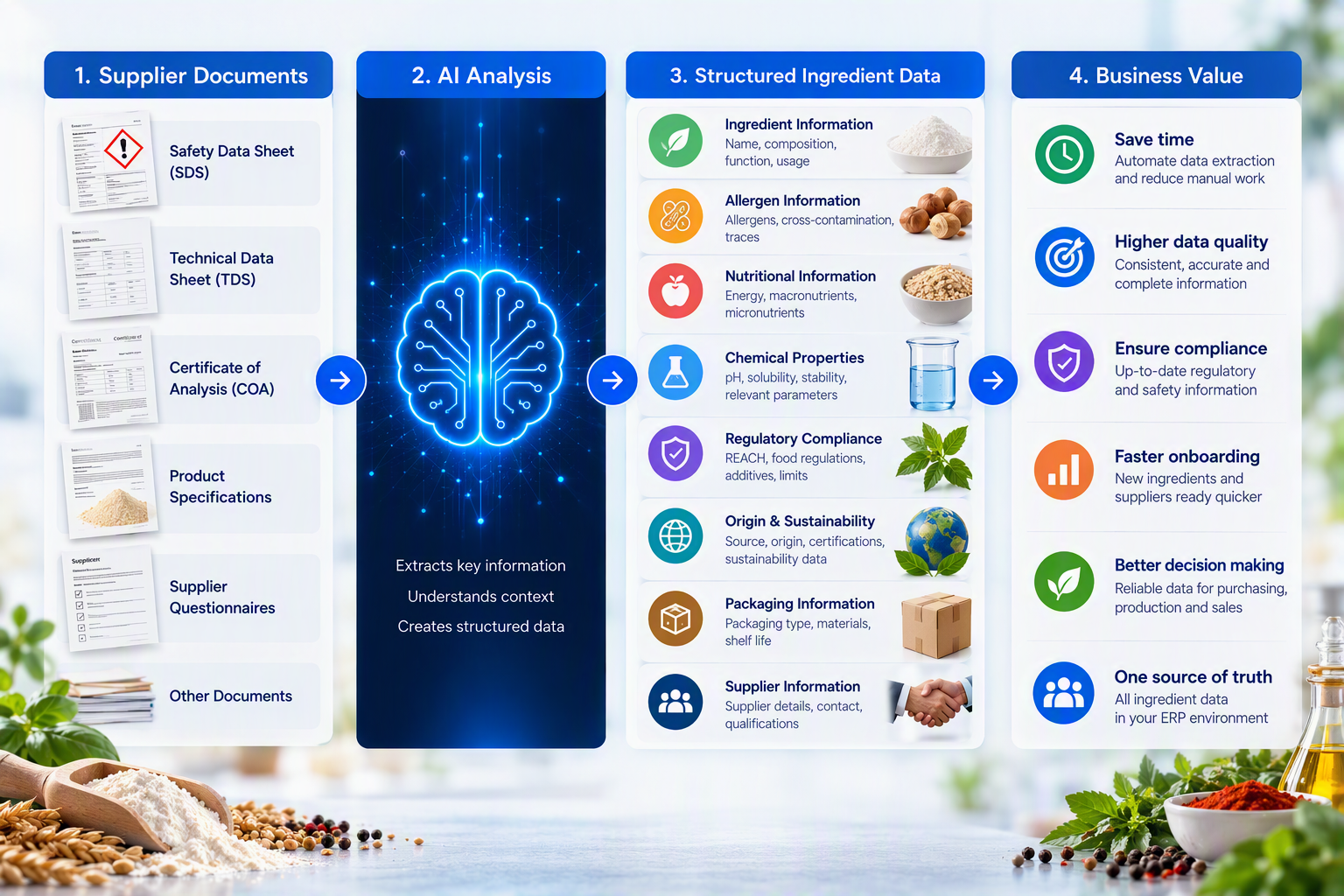
SDS, TDS, CoA and CoC processing is available. You review the extracted data, correct it where needed and approve it before it updates Business Central.
At a glance
- CAS and UN registration numbers with synonyms and item references
- GHS/CLP hazard statements, pictograms and signal words per item and lot
- ADR classes, packing groups, tunnel codes and the 1000-points rule
- UFI codes generated locally to the ECHA algorithm
- CMR documents with dangerous-goods totals per transport category
- GHS-compliant packaging label as a Word layout
- Recipe, formulation and packaging BOMs; 100 % composition checks for recipes
- Process loss separated from recipe quantity
- Extended item attributes with ranges and operators
- AI extraction of SDS, TDS, CoA and CoC, with your approval before write-back
Updates with Business Central online
Our apps are built for Dynamics 365 Business Central online and follow Microsoft's release rhythm. Updates are managed through Business Central online, rather than a separate on-premises installation.
Two major releases a year
Every app is validated against the next Business Central release before Microsoft rolls it out, to check compatibility ahead of the update.
Monthly updates included
Fixes and improvements ship through AppSource and your Business Central admin center, with the same monthly cadence as the platform.
Current and previous release supported
You can stay on the release schedule your organisation prefers; we support the current major version and the one before it.
Works well with
Easy Ingredients is one of a family of apps that share the same Business Central foundation; composition quantities come from Easy Manufacturing when both are installed.
Easy Manufacturing
Plan production by weight or formula and link engineer-to-order work to project budgets in Business Central.
- Projects, budgets and timesheets linked to the production order
- Line clearing, flushing, treatments, split components and subcontracting
- Weight, volume and formula-driven quantities
- Planning visibility and status synchronisation across order, lines and routing
Easy Quality Management
Manage lot, serial number and package status, with checks when stock is picked, consumed or shipped.
- Quarantine, pending approval and released on tracking records
- Blocked, expired or aged lots cannot be picked, consumed or shipped
- FEFO and LIFO lot selection, automatic or guided
- The supplier’s own batch number kept end to end
- Automatic expiry, ageing and quarantine timeouts
Easy Label Printing
Manage ZPL templates and print Zebra labels from Business Central. The PrintNode client runs on a local computer with printer access.
- Central ZPL templates per company and language
- GS1-128, GS1 DataMatrix, QR, Code 128 and EAN
- Preview with real order data before you print
- Printers, scales and job history visible inside Business Central
See Easy Ingredients in action
Book a short demo and we will classify one of your own raw materials and read one of your supplier safety data sheets, live in Business Central.