
Easy Enhanced Intercompany
Intercompany that keeps up with how group companies actually trade — in Business Central, without retyping.
The standard moves the order. We move everything else.
Business Central intercompany creates the partner's purchase order from your sales order — and drops the references, shipment method, ship-to contact and the link back to the source line on the way. Easy Enhanced Intercompany carries those along through the IC outbox and inbox, also across environments through a companion API. When the partner does not know the item yet, it resolves it through item references, a non-stock item or an item template with partner-specific mappings; when you want it to know, you copy the item with its units, variants, dimensions, translations and prices in one action. And purchasing sees availability per IC partner before it orders.
Key features
Everything builds on standard Business Central intercompany — outbox, inbox, partners — no parallel exchange.

Complete documents, both ways
Sales ↔ purchase documents keep references, shipment method, ship-to contact details and IC source-line links through outbox and inbox.

Across environments too
Fields the standard payload cannot carry travel through a companion API, so partners in another environment receive the same detail.

Unknown items resolved
Incoming items are matched through item references, promoted from a non-stock item, or created from the source company with a template and partner mappings.

Copy IC item
One action copies an item to mapped partner companies — units of measure, variants, dimensions, translations, references, BOM components and price-list lines.
Partner-specific mappings
Map the partner's item categories and posting groups to your templates; choose which tables and fields may transfer per partner.

Availability per IC partner
A matrix of inventory, gross requirements, planned and scheduled receipts and projected available balance by partner, with drill-down.
Built for
Groups running several Business Central companies that buy from and sell to each other.
Group companies trading internally
Production in one company, sales in another: orders flow with their details intact and link back to the source.
IC administrators
Partner item numbering, templates and permitted fields configured once per partner, not fixed per order.
Purchasing and supply chain
See what sister companies have and expect before placing the intercompany order.
What is inside
Three areas on top of standard intercompany; the app is compact by design.
Document transfer
- Sales outbox → purchase inboxSelected header, line and source-document fields travel with the transaction.
- Purchase outbox → sales inboxReferences, shipment method and ship-to details carried to the selling company.
- Posted invoices and credit memosExtra fields copied into the IC outbox when documents post.
Items and master data
- Item identificationCommon item numbers, customer item references, non-stock promotion, source-company creation with template.
- Partner mappingsItem categories and posting groups mapped to local templates; permitted tables and fields per partner.
- Copy IC itemUnits, variants, dimensions, translations, references, BOM components and prices to mapped partners.
Availability and integration
- Partner availability matrixInventory, requirements and planned receipts per IC partner, external partners selectable, with drill-down.
- Companion APICustom fields on IC inbox and outbox records exposed for cross-environment exchange.
- Shipment linksShipment document type and source references into sales and warehouse shipment lines.
One order, two companies
The standard creates the partner document; the app makes sure nothing is lost on the way and the item exists on the other side.
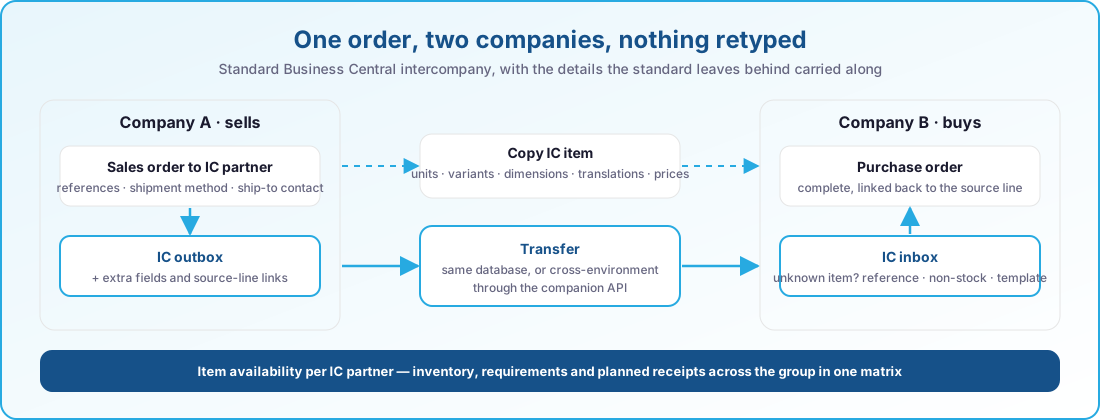
- Standard IC outbox and inbox
- Same database or cross-environment
- Item references · non-stock · templates
- Partner-specific field mappings
At a glance
- References, shipment method and ship-to contact carried through IC documents
- Source-line links on the partner document
- Cross-environment detail through a companion API
- Unknown items resolved via references, non-stock items or templates
- Partner-specific item category and posting group mappings
- Copy IC item with units, variants, dimensions, translations and prices
- Permitted tables and fields per partner
- Item availability matrix per IC partner with drill-down
- Shipment document type and source references on shipment lines
Always current on Business Central online
Our apps are built for Dynamics 365 Business Central online and follow Microsoft's release rhythm. There is no version to pick and nothing to upgrade by hand.
Two major releases a year
Every app is validated against the next Business Central release before Microsoft rolls it out, so the update wave never catches you off guard.
Monthly updates included
Fixes and improvements ship through AppSource and your Business Central admin center, with the same monthly cadence as the platform.
Current and previous release supported
You can stay on the release schedule your organisation prefers; we support the current major version and the one before it.
Works well with
Easy Enhanced Intercompany is one of a family of apps that share the same Business Central foundation.
Easy Manufacturing
Run production and engineer-to-order projects in one place, from budget to last operation.
- Projects, budgets and timesheets linked to the production order
- Line clearing, flushing, treatments, split components and subcontracting
- Weight, volume and formula-driven quantities
- Material shortages visible before the order starts
Easy Sales & Marketing
Around forty improvements to the daily sales and purchase flow.
Learn more →Manufacturing & qualityEasy Quality Management
Give every lot a status, and let the warehouse enforce it.
- Quarantine, pending approval and released as a real lot status
- Blocked, expired or aged lots cannot be picked, consumed or shipped
- FEFO and LIFO lot selection, automatic or guided
- The supplier’s own batch number kept end to end
- Automatic expiry, aging and quarantine timeouts
See Easy Enhanced Intercompany in action
Book a short demo and watch an order travel between two of your companies with every detail intact.