
Easy EDI Interface
EDIFACT orders in, shipments and invoices out — through one secured cloud endpoint, mapped with standard Business Central tools.
EDI without a black box
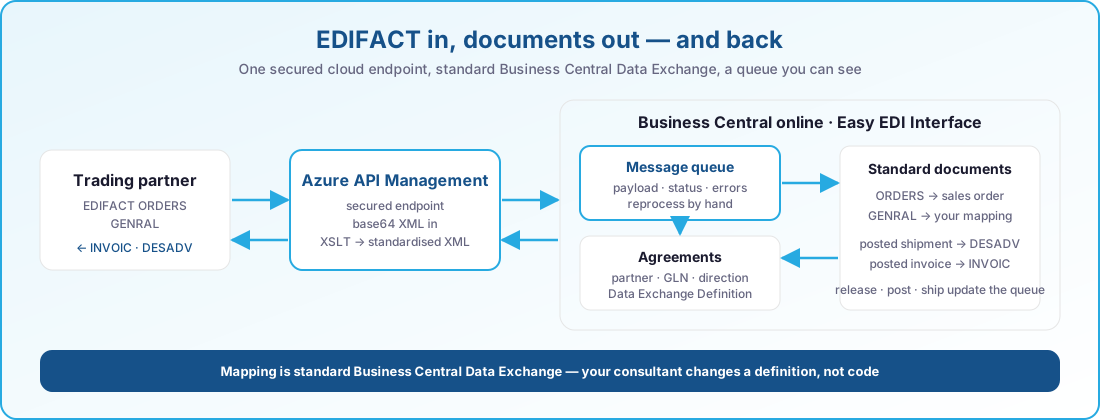
Retail and industrial customers want to send EDIFACT, not e-mail. Easy EDI Interface gives Business Central one secured endpoint on Azure API Management: the partner's message comes in as base64 XML, a stylesheet turns it into standardised XML, and the standard Business Central Data Exchange framework maps it into a sales order. Posting a shipment or an invoice sends a DESADV or INVOIC back the same way. Every message sits in a queue inside Business Central with its payload, status and error, so sales operations can see what arrived, what failed and reprocess it themselves.
Key features
Standard Business Central building blocks — Data Exchange Definitions, APIs, posting events — tied together.

ORDERS → sales order
Incoming EDIFACT orders become sales orders through the agreement's Data Exchange Definition; the created document is linked to the message.

INVOIC and DESADV out
Posting a sales invoice or shipment creates the outbound message for partners with an outbound agreement.

One secured endpoint
Azure API Management receives base64-encoded XML and applies the stylesheet; Business Central only ever sees standardised XML.
Mapping, not code
Each agreement points at a standard Business Central Data Exchange Definition — consultants adjust a mapping, nobody deploys code.

A queue you can see
Payload, status, timestamps and errors per message; reprocess requested or failed entries from the page.

Agreements per partner
Customer or vendor, sender and receiver IDs (GLN), direction, message type, encoding and character set — all on one card.
Built for
Suppliers whose customers mandate EDI, and who want it to live inside Business Central.
Sales operations
Orders arrive as sales orders, complete; the queue shows what came in and what needs a look.
Finance and logistics
Shipment advice and invoices leave automatically when the document posts.
EDI administrators and partners
Agreements and Data Exchange Definitions are maintained in Business Central; a new partner is configuration, not a project.
What is inside
A Business Central app plus an Azure API Management endpoint; both are part of Easy EDI Interface.
Transport and transformation
- API endpointA Business Central API page receives the queue entry from API Management.
- Base64 XML payloadThe message body is stored as a blob with the entry.
- Stylesheet stepAPI Management converts the partner format into standardised XML before mapping.
Inbound messages
- ORDERSImported through the agreement's Data Exchange Definition into a sales order.
- GENRALGeneral-purpose import through a configured Data Exchange Definition.
- RECADVReceiving advice is declared and routed; processing is on the roadmap.
Outbound messages
- INVOICExport of a posted sales invoice for partners with an outbound agreement.
- DESADVExport of a posted sales shipment.
- PRICATPrice catalogue export is declared and routed; processing is on the roadmap.
Trading-partner agreements
- Customer or vendorThe agreement identifies the partner and its source record.
- IdentifiersSender, receiver and provider IDs with their formats, including GLN.
- Per-agreement processingDirection, message type, Data Exchange Definition, encoding, character set and URL decoding.
Queue and recovery
- Status trackingRequested, processing, error, completed — plus document states such as open, released, shipped.
- Errors and reprocessingThe handler logs the error; staff reprocess requested or failed entries manually.
- Payload inspection and cleanupPages show payload and error; old entries can be deleted.
Monitoring and document linkage
- Role-centre cuesInbound requested, error and open; outbound requested, error and completed.
- Sales lifecycle updatesRelease, reopen, posting and shipment events update the linked message.
- Posting-triggered exportSales posting invokes the outbound handlers for the resulting shipment and invoice.
From partner message to Business Central document
The same path in both directions — inbound documents are created, outbound documents are created from postings.
- Trading partnerEDIFACT ORDERS, GENRAL
- Azure API ManagementSecured endpoint, XSLT to standard XML
- Message queuePayload, status, errors
- Business CentralSales order via Data Exchange


Inbound today
- ORDERS → sales order
- GENRAL → your Data Exchange mapping
Outbound today
- Posted sales shipment → DESADV
- Posted sales invoice → INVOIC
Message types
Where every message goes
Agreements decide the mapping; the queue keeps the evidence.
- Azure API Management
- BC Data Exchange framework
- EDIFACT
- GLN identifiers
At a glance
- EDIFACT ORDERS into sales orders
- GENRAL through your own Data Exchange Definition
- DESADV from posted shipments, INVOIC from posted invoices
- Secured Azure API Management endpoint with XSLT transformation
- Standard Business Central Data Exchange mapping — no code
- Agreements per customer or vendor with GLN identifiers
- Message queue with payload, status, errors and manual reprocessing
- Role-centre cues for inbound and outbound traffic
- Sales lifecycle events update the linked message
Always current on Business Central online
Our apps are built for Dynamics 365 Business Central online and follow Microsoft's release rhythm. There is no version to pick and nothing to upgrade by hand.
Two major releases a year
Every app is validated against the next Business Central release before Microsoft rolls it out, so the update wave never catches you off guard.
Monthly updates included
Fixes and improvements ship through AppSource and your Business Central admin center, with the same monthly cadence as the platform.
Current and previous release supported
You can stay on the release schedule your organisation prefers; we support the current major version and the one before it.
Works well with
Easy EDI Interface is one of a family of apps that share the same Business Central foundation; order desks that also run Easy Sales & Marketing get intake analytics on EDI orders for free.
Easy Sales & Marketing
Around forty improvements to the daily sales and purchase flow.
Learn more →Labels & printingEasy Label Printing
Design, preview and print Zebra labels straight from Business Central — no PC next to the printer.
- Central ZPL templates per company and language
- GS1-128, GS1 DataMatrix, QR, Code 128 and EAN
- Preview with real order data before you print
- Printers, scales and job history visible inside Business Central
Easy Barcode Scanning
Receive, put away, pick, move and count by scanning instead of typing.
- Item, lot and location validated at every scan
- Picking, put-away, movements and package reclassification
- Physical inventory counting on the device
- Runs on a Zebra scanner or a standard Android phone
See Easy EDI Interface in action
Book a short demo and we will walk one of your partner's EDIFACT orders from the endpoint to a sales order, live.